

You spent weeks refreshing the booking page, finally secured a slot for your G road test, and hit the submit button with a sigh of relief. But as the minutes turn into hours and your inbox stays empty, that relief quickly shifts into high-stakes anxiety. Dealing with the reality of my road test confirmation email not received is a common frustration for Canadian drivers, especially when you've already committed time and money to the process. You're left wondering if the transaction failed or if you've just lost a coveted examination slot at your local centre.
We understand that navigating provincial licensing systems can feel like a maze, particularly when you need immediate certainty about your booking status. You deserve to know that your appointment is secure without spending hours on hold. This guide provides a clear, step-by-step recovery process to help you track down your missing details and verify your test date instantly. We'll explore technical troubleshooting, official lookup methods, and how an independent concierge can provide the transparency you need to walk into your exam with total peace of mind.
Key Takeaways
- Learn how to methodically search digital folders and verify financial records before attempting a risky duplicate booking.
- Discover the technical reasons why "my road test confirmation email not received" scenarios occur, ranging from server-level firewalls to minor data entry errors.
- Identify alternative identification methods to access your active booking file online and confirm your appointment centre details without the original message.
- Understand the specific personal information needed to pass identity verification checks when contacting customer service for a manual file lookup.
- Explore how an independent concierge service can manage complex booking logistics to provide transparent communication and administrative peace of mind.
What to do if road test confirmation email is missing
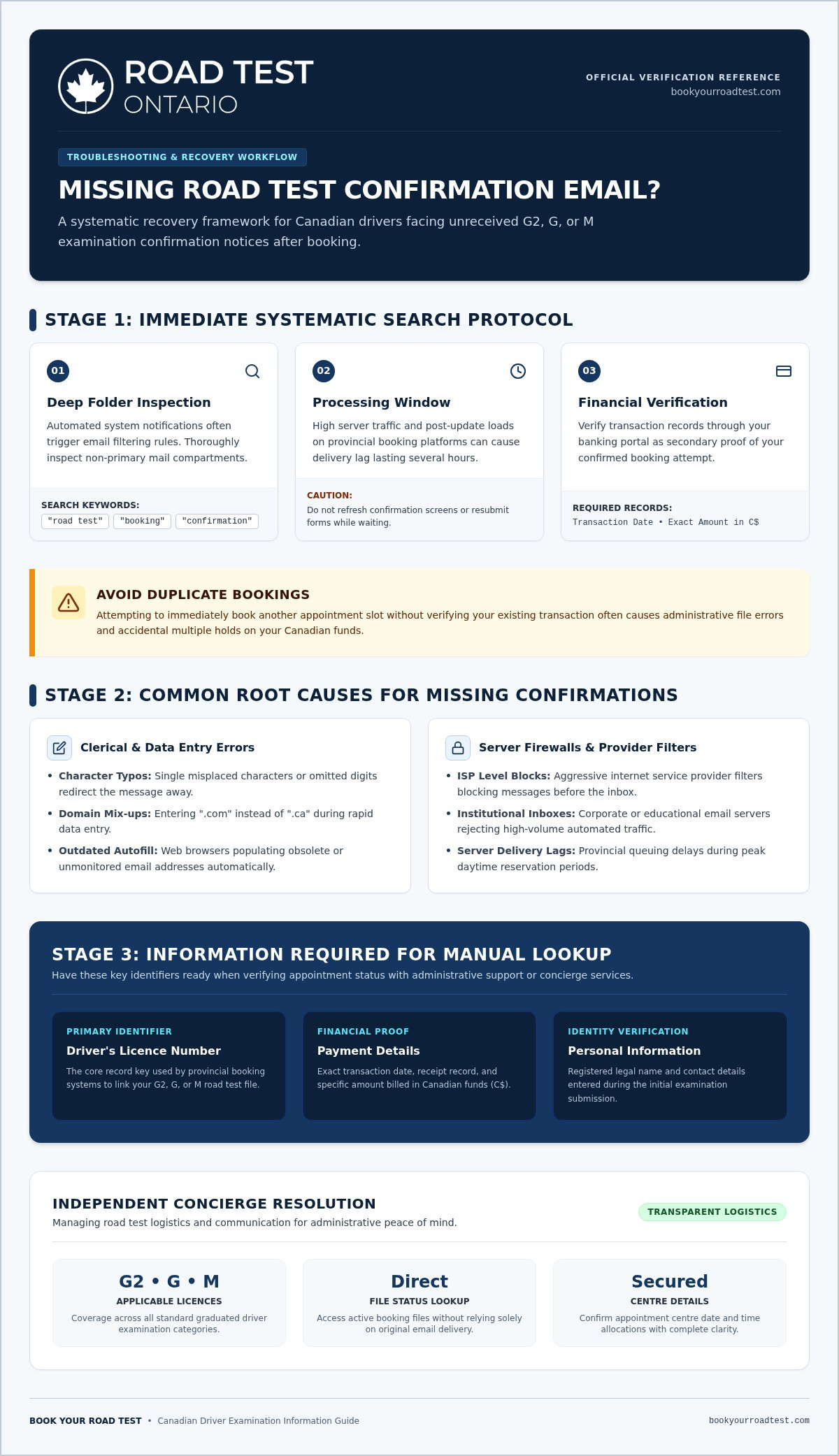
Realizing that your inbox is empty after completing a booking is a high-anxiety moment for any driver. Your first instinct might be to panic or immediately return to the portal to secure another slot. Don't do this. Attempting to book a duplicate appointment often leads to administrative errors or accidental double charges on your credit card. If you are currently dealing with the frustration of my road test confirmation email not received, stay calm and follow a systematic search process instead. Most missing messages are simply redirected by automated filters rather than lost in the digital void.
Search your junk, spam, and promotional folders
Automated systems send out thousands of notifications daily, which can trigger aggressive security protocols in modern inboxes. Because of how email systems work, these messages are often flagged as spam or sorted into promotional tabs to keep your primary inbox uncluttered. Check these subfolders thoroughly before assuming the booking failed. Many users find that the reason for my road test confirmation email not received is simply a misconfigured filter. It is also wise to peek into your trash folder; it's quite easy to accidentally delete a message while clearing out a backlog of notifications. Use the search bar in your email client to look for specific terms like "road test," "booking," or "confirmation" to narrow down the results across all your folders.
Allow adequate time for system processing delays
Digital infrastructure isn't always instantaneous. High traffic on provincial booking servers, especially during peak hours or following a system update, can cause significant delivery lags. It's common for a confirmation to take several hours to arrive even if the transaction was successful. Server lag during peak hours can delay emails significantly. While you wait, avoid refreshing the confirmation page or resubmitting your payment form. These actions don't speed up the process; they usually just complicate your record and might result in multiple holds on your Canadian funds.
Gather your transaction records
If several hours pass and you still haven't seen the message, shift your focus to your financial records. Keep your payment details handy, including the transaction date and the exact amount charged in C$. These details are essential for alternative lookup methods. Most booking systems link your appointment to your driver's licence number, but having the payment confirmation from your bank provides a secondary layer of proof. This preparation ensures that if you need to contact a concierge or administrative support, you have the necessary documentation to verify your identity and secure your G2, G, or M road test slot without further delay.
Common reasons why road test confirmation emails go missing
Technical glitches and simple human error are the primary drivers behind the frustration of my road test confirmation email not received. While official booking portals are designed to be robust, the path between a successful transaction and a message landing in your inbox is surprisingly complex. Understanding the specific points of failure can help you identify whether you need to wait, search deeper, or contact administrative support to secure your G2, G, or M road test appointment.
Typos and spelling mistakes in your contact information
Clerical errors during the high-pressure data entry phase are the most frequent cause of communication breakdowns. A single misplaced character or an omitted digit in your email address will immediately direct the automated confirmation elsewhere. Canadian drivers often fall into the trap of mixing up domain extensions; for instance, typing "dot-com" when your primary address ends in "dot-ca" is a common mistake. It's also worth double-checking your browser's autofill settings. If you've recently changed your contact details, your device might have automatically populated the form with an outdated or secondary address that you no longer monitor frequently.
Email server blocks and security firewalls
Sometimes the issue isn't on your end, but rather at the server level. Strict internet service provider firewalls can block system-generated messages entirely before they even reach your junk folder. This is particularly common if you're using a corporate or educational email address, as these systems often feature heightened security barriers designed to filter out high-volume automated traffic. If you didn't get a confirmation email, it's possible your provider's security protocols treated the booking notification as a threat. Adding standard booking domains to your safe-senders list can resolve these blockages for future updates regarding your G or M2 road test.
Browser glitches and failed transactions
Temporary browser glitches during the final checkout phase can occasionally halt the automated trigger sequence. If your internet connection flickered or the session timed out exactly as you hit "confirm," the booking might have been recorded in the database without firing the notification email. More critically, the transaction itself may have failed at the payment gateway level. If the financial handshake isn't completed in C$, the system won't initiate the confirmation sequence. To avoid these technical headaches, many drivers prefer to book through a professional concierge that provides dedicated administrative support and ensures every communication arrives exactly where it should.
How to verify your road test booking status without an email
A missing message creates uncertainty, but your digital trail remains accessible. You don't need a specific email to prove your booking exists. Your driver's licence number functions as a primary master key within Canadian booking databases. By using this unique identifier, you can bypass the need for an inbox confirmation and verify your status directly through the system's backend. This approach provides immediate clarity and ensures you don't miss your scheduled G2, G, or M road test due to a simple communication failure.
Use your driver's licence number for an online lookup
Navigate back to the official or third-party portal where you initially scheduled your appointment. Most platforms provide a "Manage Booking" or "Check Status" feature that allows you to confirm your appointment without a confirmation number. You'll typically need to input your licence number and its expiry date to pull up your active files. This method is highly reliable because it pulls data directly from the live database rather than relying on the delivery of an external message. Once your appointment details appear on the digital dashboard, take a clear screenshot or print the page to a PDF. This ensures you have physical proof of the date, time, and centre location, effectively resolving the anxiety caused by my road test confirmation email not received.
Analyze your credit card or bank statement
Examine your financial records to confirm if the transaction was successfully processed in C$. A pending or settled charge on your credit card statement is a strong indicator that the booking system accepted your request. Locate the unique transaction reference number listed alongside the administrative fee charge; this code is often the same one used by customer support to track your file. If you see the charge but still face the issue of my road test confirmation email not received, you can rest assured that the slot is likely reserved. Conversely, a missing charge usually indicates that the booking attempt was unsuccessful at the payment gateway level. In such cases, the system wouldn't have triggered a confirmation because no official booking was finalized. Checking your balance helps you realize whether you need to wait for a delayed email or restart the process entirely.
Actionable steps to recover your missing booking details safely
If your initial attempts to locate your digital records haven't yielded results, it's time to transition from passive searching to active recovery. You shouldn't let the problem of my road test confirmation email not received linger until the day of your examination. Taking decisive action now ensures that you have the necessary documentation to present at the examination centre, preventing a last-minute cancellation or a denied entry. By engaging directly with support channels, you can verify your G2, G, or M road test details and secure a manual resend of your vital booking information.
Contact support with your transaction details
Reach out to the support team of the specific service you used to book your appointment. If you utilized a third-party concierge, their administrative staff is typically equipped to handle manual file lookups and identity verification. Prepare your full name, driver's licence number, and the approximate time of your transaction in C$. This data allows the agent to locate your file even if the automated system failed to trigger a notification. During your conversation, ask the agent to read back the email address on file character by character. If a typo is discovered, request that they update the record and resend the confirmation to an alternative address. Document the name of the agent you spoke with and the specific reference number they provide; this creates a verifiable paper trail that protects your booking status.
Secure physical or digital proof before your test day
Having a screenshot or reference number prevents test-centre turning-away. While many centres can technically pull up your file using your physical licence, relying on their internal system during a busy morning is a significant risk. If you are still missing a formal email on the day of your exam, arrive at the examination centre at least 30 minutes before your scheduled slot. This buffer gives the administrative staff enough time to verify your booking manually without causing you to miss your examination window. Ensure your physical licence is current and that the information matches the system records exactly. If you prefer to avoid the stress of manual recovery, you can book your road test through a managed service that handles all administrative tracking and communication for you.
Confirming your details ahead of time provides the clinical certainty needed for a successful exam day. When you deal with the reality of my road test confirmation email not received, your priority should be obtaining a unique transaction ID. This number serves as your final insurance policy. Whether you store it in a digital wallet or write it down, having this reference ensures that your financial transaction translates into a guaranteed seat in the examination vehicle.
How to organize future road test bookings without the stress
Avoiding the high-anxiety cycle of my road test confirmation email not received starts with choosing a more transparent booking path for your next G2, G, or M licence exam. While official systems are the standard, they often lack the dedicated administrative support required to navigate technical glitches or delivery failures. Transitioning to a managed approach allows you to focus on your driving skills rather than digital troubleshooting. By organizing your future appointments through a professional concierge, you ensure that every transaction is tracked and every confirmation is verified by a human facilitator.
The benefits of using an independent booking service
Independent third-party platforms offer simplified interfaces specifically designed to reduce user entry errors. A single typo in a government portal can lead to weeks of confusion, but a concierge service provides a layer of oversight to catch these mistakes before they disrupt your schedule. These providers operate autonomously from government ministries, charging an administrative convenience fee to handle the complex logistics of your file in C$. When you use a professional service, you gain access to dedicated customer support channels. This means you can track down missing details or verify your appointment centre without enduring long government hold times. It turns a high-stakes task into a managed process with clear, reliable communication at every step.
Leveraging a cancellation finder for earlier test dates
One of the most significant advantages of professional administrative support is the ability to secure earlier examination dates seamlessly. Instead of manually checking a portal multiple times a day, an automated cancellation finder actively monitors the system for slots that open up due to other candidates rescheduling. This proprietary tool provides a specific shortcut for drivers who are in a hurry to complete their licensing requirements. It removes the guesswork and ensures that when a slot becomes available, you're notified immediately through a secure, verified channel. This level of organization prevents the frustration of missing out on a time-sensitive opening.
To maintain clear records moving forward, always use a reliable personal email address for official business. Corporate and educational filters are often too aggressive for automated booking notifications, which is a primary cause of my road test confirmation email not received. By combining a stable contact method with the oversight of a concierge, you effectively eliminate the risk of missing vital information. Book your road test with confidence today using our streamlined independent service to ensure your next licensing step is efficient and entirely stress-free.
Secure Your Booking and Drive with Confidence
Experiencing the stress of my road test confirmation email not received doesn't mean your licensing journey has stalled. By systematically verifying your financial records and using your driver's licence as an online lookup key, you can easily reclaim control over your scheduling data. These alternative verification methods ensure you can walk into the examination centre with complete certainty regarding your appointment time.
If you want to bypass technical glitches entirely for your upcoming G2, G, M2, or M exam, choosing an autonomous concierge service provides a reliable alternative. You gain access to clear administrative support and an automated cancellation finder designed to secure earlier dates without the typical system backlogs. Let us handle the details and secure your next road test hassle-free so you can focus entirely on sharpening your driving skills. Your path to a full Canadian licence is well within reach, and with the right administrative tracking, you'll stay firmly in the driver's seat.
Frequently Asked Questions
What should I do if my road test confirmation email is not received within 24 hours?
You should first verify your bank statement to confirm if the transaction was successfully processed in C$. If a charge is visible, log back into the booking portal using your driver's licence number to check your active files. Avoid submitting a second booking to prevent accidental duplicate charges. If the dashboard is empty, contact the specific customer service channel you used to secure a manual lookup.
Can I still take my road test if I do not have the confirmation email?
Yes, you can still take your exam because the test centre relies on the live database rather than your inbox. The digital file linked to your driver's licence serves as the official record of your G2, G, M2, or M appointment. However, dealing with the reality of my road test confirmation email not received means you must secure alternative proof, such as a dashboard screenshot or bank reference number, before your test day.
How can I check my road test date using my driver's licence number?
Navigate directly to the "Manage Booking" or status page of the platform where you scheduled the exam. Input your licence number along with its expiry date to pull up your active file. This backend search bypasses the need for an email confirmation entirely. Once the details load, capture a screenshot of the date, time, and centre location to keep for your records.
Why did my bank account get charged if I never received a booking email?
A credit card charge accompanied by the scenario of my road test confirmation email not received indicates the payment gateway succeeded but the notification sequence failed. This communication breakdown happens due to server lag, clerical email typos, or aggressive junk filters. The charge confirms your slot is likely reserved in the system, so you should perform a manual licence lookup to verify the file.
Could my confirmation email have been blocked by my internet service provider?
Yes, internet service providers and email hosts frequently block automated system messages at the server level before they reach your inbox. This occurs because high-volume notification systems can trigger security firewalls, especially on corporate or educational domains. To prevent this issue during future bookings, add the domain of your independent concierge or booking service to your safe-senders list.
What details do I need to bring to the examination centre if my email is missing?
You must bring your valid physical driver's licence as your primary identification key. It's also highly recommended to bring your bank transaction reference number or a screenshot of your online booking dashboard. Arrive at the examination centre at least 30 minutes early so the administrative staff can manually locate your file in the database if any system discrepancies arise.


