

A confirmation email sitting in your inbox doesn't always mean your testing slot is officially locked into the live examination system. Finding yourself standing at the counter only to discover no valid booking exists is every driver's worst nightmare. When test day anxiety is already running high, confusing confirmation codes and uncertainty between independent booking services and government records only add to the stress. Knowing how to verify a road test appointment beforehand ensures your slot is active and eliminates that guesswork.
You deserve total certainty before you get behind the wheel. In this guide, you'll learn how to cross-reference your credentials online or over the phone to confirm your exact date, time, and examination centre location. We'll also break down which documentation serves as valid proof on test day and how to resolve booking mismatches before you face frustrating cancellation penalties. Here is your step-by-step roadmap to auditing your booking with confidence.
Key Takeaways
- Confirming your reservation directly against live database records ensures administrative processing errors don't jeopardize your spot on test day.
- Follow our step-by-step walkthrough on how to verify a road test appointment using your driver's licence details and confirmation reference codes.
- Learn to distinguish between routine system maintenance outages and critical typographical errors on your testing profile.
- Take immediate corrective action using transaction receipts and banking records if an active booking fails to appear online.
- Discover how independent booking management platforms streamline appointment tracking with centralized records separate from public licensing portals.
Why Verifying Your Road Test Appointment Is Essential Before Test Day
Securing a test reservation requires more than just submitting your personal details online. Administrative processing delays, server timeouts, or banking authorization pauses can leave your reservation suspended in limbo. If you arrive at an examination centre without an active file in the live system, staff cannot legally conduct your assessment. Knowing how to verify a road test appointment well before your scheduled date safeguards your preparation, protects your schedule, and guarantees that an examiner is actually reserved for your vehicle.
The Risk of Unconfirmed Road Test Bookings
Showing up to an unconfirmed booking derails months of preparation. Examination centres run on rigid timetables; they cannot accommodate walk-ins when a scheduling glitch leaves you off the daily manifest. Missing your intended evaluation means forfeiting your testing window entirely. Even worse, many licensing jurisdictions enforce mandatory waiting periods before you can rebook a practical driving test, delaying your licence upgrade by weeks or even months. Catching administrative errors early gives you time to rectify system discrepancies before your target date arrives.
Understanding Booking Confirmations vs Official Records
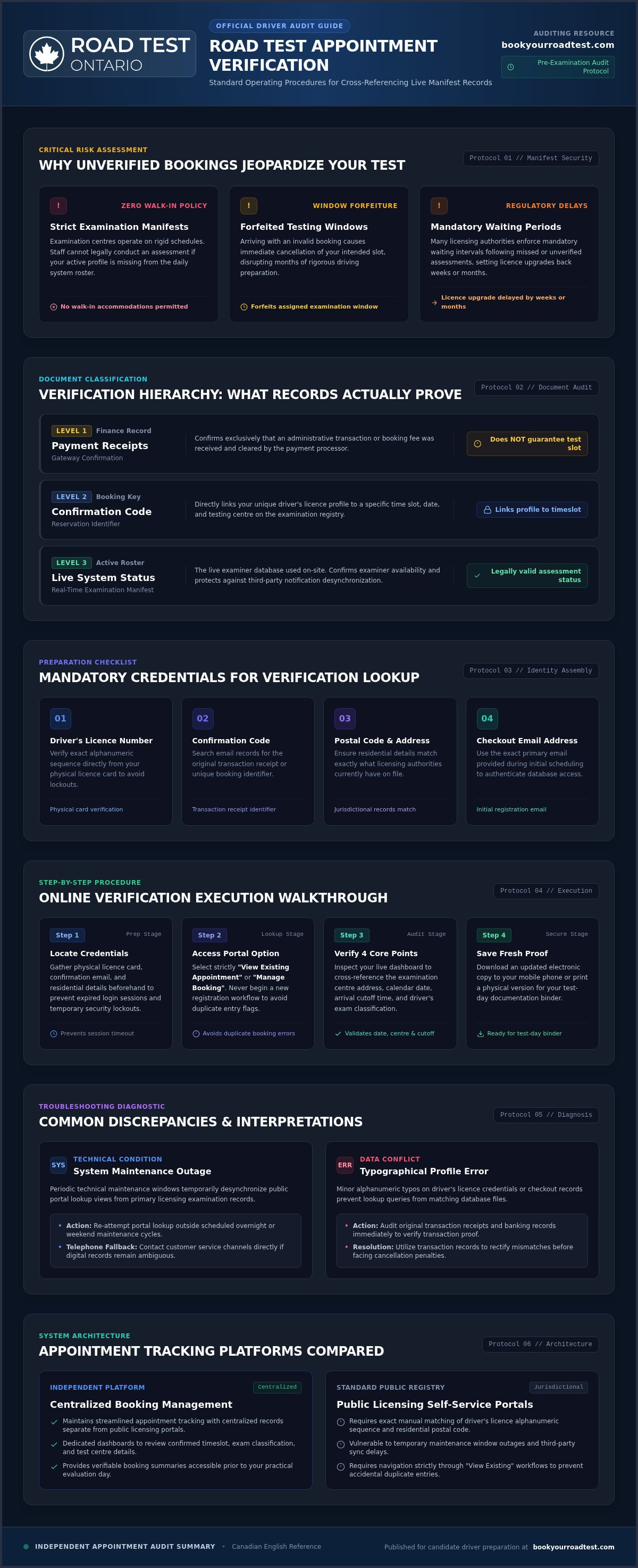
Many drivers assume an automated email receipt equals a locked-in appointment. It often does not. Understanding the difference between transactional paperwork and live database entries is critical:
- Payment Receipts: These documents merely confirm that an administrative transaction or fee was processed by a payment gateway. They do not confirm that an examination slot was successfully assigned.
- Booking Confirmation Codes: A valid confirmation code directly links your unique driver's licence profile to a specific time slot on the official examination ledger.
- Live System Status: Official test manifests update in real time. Periodic technical maintenance windows can occasionally desynchronize third-party notifications from primary licensing databases.
Checking your status directly against live records ensures your confirmation code matches the active schedule at your designated test centre. By taking a few minutes to audit these details early, you remove unnecessary friction and walk into your examination with complete peace of mind.
Step-by-Step Guide: How to Verify a Road Test Appointment
Confirming your booking should not feel like an administrative maze. Whether you booked through an official licensing portal or an autonomous concierge dashboard, checking your status early guarantees everything runs smoothly. Follow this structured walkthrough on how to verify a road test appointment to ensure your file is active and fully recognized before test day.
Locating Your Mandatory Verification Credentials
Before launching any portal, assemble your personal paperwork. Having these details handy prevents expired login sessions and temporary security lockouts:
- Valid Driver's Licence Number: Check your physical licence card to confirm the exact alphanumeric sequence.
- Confirmation Reference Code: Search your inbox for your original transaction receipt or reservation identifier.
- Postal Code and Address: Ensure the residential address matches what licensing authorities have on file.
- Email Address: Use the exact email address provided during the initial checkout process.
Navigating the Online Verification Portal
Most licensing authorities feature a dedicated self-service lookup tool. Always select the "View Existing Appointment" or "Manage Booking" option rather than starting a new registration workflow, which could accidentally flag duplicate entries. Enter your credentials carefully to open your live dashboard. If your booking is managed through our independent service, you can easily review your confirmed time slot, exam classification, and centre details through Book Your Road Test.
Once logged in, verify the exact examination centre address, date, and arrival cutoff. While individual jurisdictions handle digital infrastructure differently, many drivers consult portals to confirm your appointment details online and download a fresh electronic copy. Save this updated summary to your mobile phone or print a physical version for your test-day binder.
Verifying by Telephone or Customer Service Channels
If digital records seem ambiguous, a quick call to licensing support provides definitive clarity. Have your licence number and transaction reference ready before dialing. Ask the customer service agent to read back your confirmed date, testing centre, and licence class. Finally, request that they immediately dispatch a fresh electronic confirmation notice directly to your primary email address for your personal records.
Common Verification Discrepancies and How to Interpret Them
Running a status check only to encounter an error screen can trigger immediate panic. In most cases, a missing or conflicting record stems from simple administrative mismatches rather than an outright cancellation. Understanding what these system alerts mean is an essential part of mastering how to verify a road test appointment accurately.
Resolving "No Record Found" System Notifications
Seeing a blank screen or a "no record found" prompt usually traces back to subtle data entry errors. Driver's licence numbers must be entered with precision, matching any specific spacing or letter cases found on your physical card. If you recently renewed your credentials and hold a temporary paper driving permit, the online system might still be indexed under your previous card sequence.
System maintenance windows also cause temporary outages. Official testing registries frequently run database backups during late-night hours, which temporarily pulls active reservations offline. If you secured your booking within the last sixty minutes, allow adequate processing time for the transaction to propagate across central records before attempting another lookup.
Handling Mismatched Test Centres or Vehicle Classes
Another frequent issue involves booking the wrong vehicle category or examination facility. An applicant preparing for a motorcycle evaluation might accidentally reserve a standard passenger car slot. For specific requirements on graduated motorcycle testing, consult our M2 Road Test Booking Guide.
Inspect your examination centre details carefully. Licensing authorities occasionally reassign administrative check-in bays or divert applicants to nearby auxiliary facilities to handle seasonal testing volume. In these scenarios, your booked date and time remain intact, but your physical check-in location may have changed. If your verification displays an unexpected "Cancelled" status, it typically signals an uncollected fee, an expired prerequisite licence, or a duplicate reservation flagged by fraud prevention filters. Reaching out to administrative support right away ensures you can resolve these discrepancies before your testing slot is released to another driver.
What to Do If Your Road Test Appointment Cannot Be Verified
Discovering that your reservation is nowhere to be found after completing the steps for how to verify a road test appointment can feel alarming. Do not rush to submit a brand new reservation immediately. Submitting multiple bookings back-to-back can trigger automated security protocols, causing additional delays or administrative locks on your driver profile. Instead, take a methodical approach to uncover what happened and restore your spot.
Documenting Proof of Your Original Reservation
Begin by verifying your financial records. Review your credit card or online banking statement to ensure the administrative or testing fees were fully processed rather than held as pending authorizations. An incomplete payment transaction is one of the most frequent reasons a booking silently lapses before being committed to central examination records.
Assemble a concise verification portfolio to present to scheduling support:
- Bank Statements: Export transaction confirmation lines showing the exact processing date, time, and reference code.
- Electronic Timestamps: Gather any initial order confirmation pages, payment receipts, or system emails received during registration.
- Error Documentation: Take clear screenshots of any portal notifications indicating missing records or database timeouts.
Contact the customer support desk immediately with these details. A representative can cross-reference your payment identifier against internal transaction ledgers to restore or manually confirm your assigned slot.
Securing an Earlier Replacement Appointment
If an unconfirmed appointment slot has cleared completely from the schedule, you must act decisively to lock in an alternate date. Calendar availability shifts continuously as other drivers adjust their schedules. Rather than manually refreshing public booking systems throughout the day, utilize an automated tool like the Road Test Cancellation Finder to track newly released slots in real time.
Maintaining broad flexibility regarding your testing days and times significantly boosts your chances of recovering from a lost date. When you want complete peace of mind, reliable tracking, and proactive schedule updates, you can manage and confirm your road test appointment through our autonomous concierge booking service today.
Simplifying Appointment Tracking and Road Test Scheduling
Dealing with public booking systems often feels tedious and unpredictable. Standard government portals expect candidates to log in repeatedly, decipher complex status codes, and manually watch for changes. Learning how to verify a road test appointment is a vital protective measure, but ongoing manual checks can quickly consume hours of your week. Autonomous concierge services eliminate this administrative burden by centralizing your scheduling details in one reliable hub.
The Value of Dedicated Booking Concierge Services
Operating as an independent third-party provider with no government affiliation, a booking concierge acts as your administrative buffer. The platform organizes your G2, G, M2, or M road test booking through a simplified dashboard designed for clarity. Transparent administrative convenience fees cover ongoing booking management and direct support, keeping concierge services completely separate from official government examination fees. Instead of wrestling with unresponsive public portals or wondering whether your reservation vanished, you receive clear, dependable oversight from start to finish.
How to Lock In and Verify Your Next Road Test
Regaining control over your driving timeline doesn't require constant screen monitoring. When you partner with a specialized booking service, the administrative friction disappears:
- Custom Availability: Specify your target examination dates and preferred testing centres.
- Proactive Status Audits: Automated systems monitor your booking records continuously so you don't have to wonder how to verify a road test appointment before test day.
- Instant Digital Updates: Receive immediate notifications straight to your inbox whenever an earlier slot opens or your itinerary updates.
Focus your energy on refining your driving skills rather than refreshing slow licensing databases. Visit Book Your Road Test today to lock in your preferred date and experience seamless, stress-free appointment tracking.
Take Full Control of Your Road Test Schedule
Walking into your driver examination should feel empowering, not uncertain. Mastering how to verify a road test appointment guarantees your driver's licence details match live testing manifests, protecting your slot from clerical mismatches and unexpected delays. A quick audit today ensures you don't face stressful administrative setbacks tomorrow.
Managing your testing itinerary doesn't have to be complicated. Operating as an autonomous third-party provider without government affiliation, we deliver streamlined appointment scheduling and record management backed by transparent, dedicated customer assistance. Whether you need centralized record oversight or automated date tracking via the Road Test Cancellation Finder to secure an earlier opening, our digital tools keep your driving journey moving forward.
Verify or Secure Your Road Test Appointment Today and head into your assessment with total confidence.
Frequently Asked Questions
How can I verify my road test appointment online?
You can verify your booking online by visiting the official licensing portal's appointment management page or your third-party account dashboard. Enter your valid driver's licence number, residential postal code, and email address. The live database will immediately show your confirmed appointment time, date, and designated examination centre. If you're wondering how to verify a road test appointment managed by an autonomous concierge, log into your dedicated portal to view your synchronized itinerary.
What details do I need to check my road test booking status?
You need your physical driver's licence number, residential postal code, and original booking reference code. Most registries and independent scheduling dashboards also require the exact email address used during initial checkout. Having your physical licence card in front of you ensures you enter the correct alphanumeric sequence without typo errors. Keeping these details accessible prevents accidental security lockouts while completing your routine status audit.
Why is my road test appointment not showing up in the system?
Your appointment might not show up due to recent data synchronization lags, typographical errors during login, or an uncollected testing fee. Licensing databases routinely undergo scheduled system maintenance during off-peak hours, temporarily hiding confirmed records from view. In other cases, subtle spacing errors in your licence number prevent matching. If your slot still doesn't appear after auditing your credentials, an incomplete payment transaction likely caused the reservation to clear automatically.
Can I verify my road test appointment over the phone?
Yes, you can verify your appointment details by calling the central licensing contact centre or your third-party booking support line. Have your driver's licence card and transaction reference number ready before speaking with a representative. Once connected, ask the customer service agent to confirm your exact examination date, check-in time, and testing centre location. You can also request that they send a fresh verification summary directly to your inbox.
What should I do if my road test confirmation email never arrived?
Check your spam or junk folder first, as automated notifications frequently get filtered by strict email security settings. If the message is missing, check your banking records to ensure the administrative charge fully cleared. Once verified, visit the self-service lookup portal to check your status manually or contact customer support with your payment timestamp. An agent can correct clerical email typos and dispatch a fresh confirmation notice immediately.
Will checking or verifying my appointment accidentally cancel or reschedule it?
No, simply viewing or verifying your road test details will never cancel or alter your reserved time slot. Online lookup portals and autonomous dashboards require explicit, multi-step confirmations before any cancellation or rescheduling action takes effect. As long as you only access the view-booking or status-check tabs without submitting modification requests, your slot remains secure. Auditing your records early is the best way to safeguard your scheduled date.
What physical proof of appointment must I bring to the examination centre?
You should bring your current physical driver's licence card along with a printed or digital copy of your booking confirmation. Examination staff verify your eligibility using your physical licence, but carrying a printed confirmation receipt helps resolve any on-site desk discrepancies instantly. Ensure your vehicle meets all mechanical safety standards and carries valid registration and insurance papers. Having these items organized in advance guarantees a seamless check-in experience.


