

If you searched “can't find my driver's license number for booking,” start by checking exactly which number the form requests. A driver’s licence number, card number, test reference and booking confirmation may identify different things. Guessing or swapping one for another can cause an entry error or delay your booking.
If your licence card is lost, damaged or out of reach, it’s understandable to worry that your road-test plans will be delayed. Verify the correct information through the licensing authority that issued your licence rather than relying on an old reference. Keep your personal details private while you look for them.
This guide explains how to identify your licence number, what to do if you can’t access it, and what to prepare before booking. Once your details are ready, Book Your Road Test can assist with scheduling G2, G, M2 and M road tests at DriveTest centres. It is an independent third-party service, not affiliated with the Ontario Ministry of Transportation or DriveTest. Booking assistance has an administration fee separate from official test fees.
Key Takeaways
- If you can't find your driver's license number for booking, check whether the form asks for your licence number, rather than a card number or booking reference.
- Without your physical card, look for the number in secure personal records or official correspondence. The details available vary by issuing jurisdiction.
- Whether you can book without the number depends on the booking system. Don’t guess; verify the requested details before trying again.
- Use a simple check: confirm the field, locate your number, compare your entry with a current official record, then retry.
- When your details are ready, Book Your Road Test can assist with scheduling at more than 60 DriveTest centres. The independent service charges an administration fee separate from official test fees.
Can't find your driver's licence number for booking? Start by identifying the number
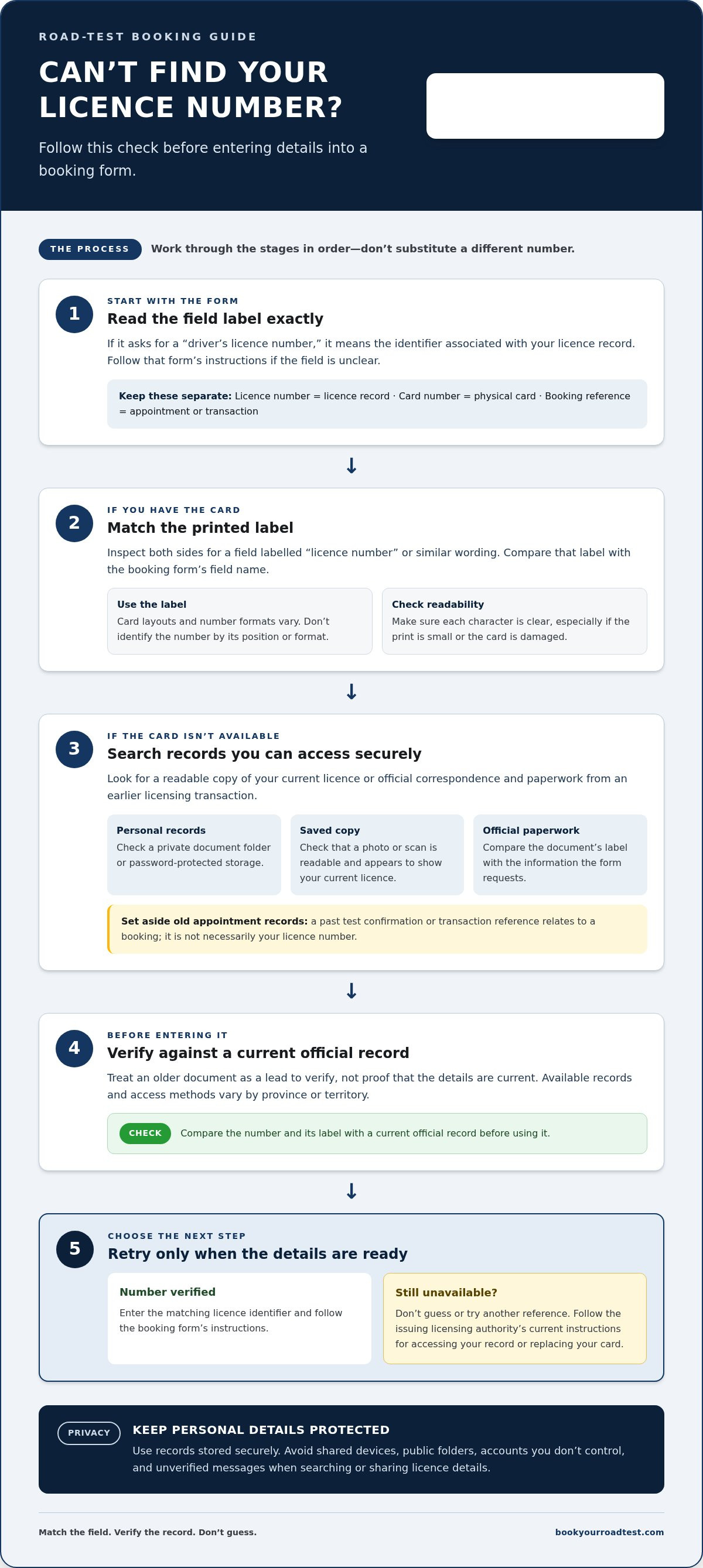
It’s easy to mix up the number printed on a licence card with the identifier a road-test booking form requests. Before entering anything, read the field label and match it to the wording on your licence or official record. Don’t enter a number just because it is the first or most prominent one you see.
A driver’s licence number identifies your driver’s licence record. A card number may identify the physical card, while a test booking reference or confirmation number relates to an appointment or transaction. The Driver's license overview explains the general purpose of licences and how they can differ around the world; it is not a guide to a specific Canadian booking form.
In short, a licence number identifies your driver’s licence record; a booking reference identifies a particular appointment or transaction.
Which number does a road-test booking form mean?
Match the requested field label exactly. If a form says “driver’s licence number,” enter the identifier associated with your licence record, not a confirmation code from an earlier booking. A confirmation or transaction reference can help you refer to a specific service interaction, but it does not replace your licence identifier.
Booking processes vary by platform and jurisdiction, and a form may request other identifying details too. Don’t assume every road-test booking system asks for the same information. If a field is unclear, pause and follow the instructions for that form instead of trying different numbers until one is accepted. If you’re thinking, “can't find my driver's license number for booking,” this is the point to check the label before looking for a substitute.
Where to look on your driver's licence
If you have the physical card, inspect both sides and look for a field labelled “licence number” or similar wording. Card layouts and number formats aren’t universal across Canada, so don’t identify the number by its position, length or whether it contains letters. Use the printed label rather than assumptions based on another person’s card or a card from a different jurisdiction.
Compare the card’s label with the booking form’s field name. If the form asks for a licence number and you’ve found a separate card number, don’t treat them as interchangeable unless the form’s instructions say to. Check that you can read each character clearly, particularly if the print is small or the card is damaged. A careful comparison can prevent an entry error and save you from having to revisit the form.
- Read the form label: Identify the exact information requested.
- Find the matching card field: Use the printed label, not the number’s position or format.
- Keep references separate: Set aside appointment confirmations and transaction details unless the form specifically requests them.
Once you’ve identified the field the form means, compare it with the information you have. If you don’t have the card or can’t read the number, don’t guess. Look for the details in records you can access securely.
Where to find your driver's licence number when you don't have the card
If your card isn’t in front of you, you may still be able to locate the number in records you already have. Search documents that belong to you and are stored securely. What information appears on a record, and how you can access it, varies by province or territory. Treat an old document as a lead to verify, not proof that the details are current.
Check records you already have access to
Start with the places where you keep important personal documents. A clear, securely stored photo or scan of your current licence may show the labelled number. You can also review official correspondence or paperwork from an earlier licensing transaction, if you still have access to it. Avoid searching shared devices, public folders or accounts you don’t control.
Keep the search focused:
- Review secure personal records. Check a private document folder, password-protected storage or another place you use for sensitive information.
- Look for a saved copy. If you photographed or scanned the card, check that the image is readable and appears to show your current licence.
- Check official correspondence. Look for licensing documents that may include identifying details, then compare the label with the field requested by the booking form.
- Set aside appointment records. A past test confirmation or transaction reference relates to a booking. It is not necessarily your licence number.
Protect your information as you search. Don’t send a licence image or number through an unverified message, and don’t save sensitive details somewhere others can access. If you find a number on an older document, compare it with a current official record before entering it. An outdated copy or an unclear image can create another mismatch instead of solving the problem.
If your driver's licence is lost, damaged, or inaccessible
Access and replacement procedures depend on the jurisdiction that issued your licence. Use that licensing authority’s current instructions for accessing your driver-licence record or replacing your card. If your licence was issued in Canada, follow the guidance from the responsible provincial or territorial authority rather than relying on advice intended for another jurisdiction.
Don’t assume an online account, phone process, required document or processing time is the same everywhere. Procedures can change, so use current instructions from the authority responsible for your licence. Be cautious of anyone claiming they can retrieve or replace your official licence number; use the issuing authority’s process for guidance about your record or card.
After verifying your number and gathering the details required for your booking, you can use road-test booking assistance to arrange a test at a DriveTest centre. Book Your Road Test is an independent third-party service, not affiliated with the Ontario Ministry of Transportation or DriveTest. Its administration fee is separate from official test fees.
Can you book a road test without your driver's licence number?
Possibly, but don’t assume you can proceed without it. The information required depends on the booking system and the jurisdiction handling your road test. If a form marks the licence number as required, don’t guess, enter a different reference or use someone else’s details. If you’re asking, “can't find my driver's license number for booking,” pause and verify what the form requests before submitting anything.
Card available: Find the field labelled for your licence number and enter the matching details from your current card. Don’t substitute a separate card number unless the booking instructions identify it as the requested value.
Card lost: Check secure personal records or official correspondence for the number. If you can’t verify it, follow the issuing jurisdiction’s official process to access or replace your licence information before trying to book.
Number uncertain: Don’t test different numbers in the form. Recheck its field label and compare it with your current official record. If you still can’t identify the right information, stop rather than submit a guess.
When the number is required to continue
A required field is a signal to resolve the information gap, not to enter a made-up number. A guess may be rejected, attach incorrect details to your booking attempt or create extra work if the information needs correction. Someone else’s licence details could associate the request with the wrong driver. Keep your information accurate and private.
Check the field name, confirm which number it requests and compare your entry with your current official record. If you’ve lost access to that record, follow the issuing authority’s current instructions. An old confirmation or transaction reference is not a substitute for your licence number. Booking information and licensing procedures vary across provinces and territories, so follow the instructions for the authority responsible for your licence.
Keep the costs distinct as well. An official road-test fee is separate from any administration fee charged by an independent third-party booking service. A booking service can assist with scheduling, but your licence details must come from the relevant official record.
When you are unsure which booking route applies
You can use the official booking route for your jurisdiction or choose independent administrative booking assistance. Either way, have the required licence information ready and follow the form’s instructions. Book Your Road Test provides independent booking assistance and is not affiliated with the Ontario Ministry of Transportation or DriveTest.
If you’re arranging an M2 test, the M2 road-test booking guide explains the booking path. Confirm your licence details first, then choose the route that works for you. Don’t let urgency turn an uncertain number into a submitted error.
What to do before trying your road-test booking again
Once you’ve found a likely match, check it before making another booking attempt. If you’re still thinking, “can't find my driver's license number for booking,” don’t fill the gap with a guess. Work through the steps below and make sure each licence detail matches your current official record.
A quick checklist before submitting
Use this four-step check before you retry. It can catch a wrong field, a copying mistake or a mismatch between the test you want and the information you’ve entered. Follow the booking system’s instructions if it specifies a format or asks for additional details.
- Confirm the field. Read the label and verify which licence detail it requests.
- Locate the number. Use your current card or another reliable record you can access securely.
- Check your entries. Review each character and make sure the licence class and test type are correct.
- Retry after verifying the details. Follow the booking system’s instructions and review the information again before submitting.
Take particular care with similar-looking characters and any spaces or punctuation. Don’t assume the system will interpret an entry as you intend. If your record and the form use different labels, stop and clarify which field is required instead of changing the number at random.
If the booking form still rejects your information
Stop repeated attempts. Note the exact wording of the error and the field it refers to, but don’t post a screenshot publicly or send it through an unsecured message. Screenshots can expose your licence number, name or other personal details. If you need to keep a record, store it privately and remove sensitive information before sharing anything through an appropriate official channel.
An error may point to a missing field or information that needs review, but don’t assume you know the cause. Recheck your entries against your current official record, then verify the requirements through the relevant official licensing or booking channel. Avoid changing unrelated details just to get past the form. If the number itself is uncertain, resolve that first instead of making another attempt with guessed information.
When you consult the official channel, have the relevant details ready: the booking route you used, the field in question and the error wording. Keep your full licence number private unless you’re entering it into a secure, appropriate service. A booking service cannot replace the official process for confirming your licence information.
After resolving the number issue, decide whether to book through the official route or use independent administrative assistance. If you already have a booking and want an earlier date, the Ontario road-test cancellation finder guide explains that separate option. Book Your Road Test is an independent third-party service, not affiliated with the Ontario Ministry of Transportation or DriveTest. Once your details are verified, arrange road-test booking assistance.
Book your road test once your licence number is ready
With your licence number verified, prepare the details requested by the booking form and choose how you want to arrange your road test. If you searched “can't find my driver's license number for booking,” the safest next step is to confirm the right number, avoid substituting other references and use your current official record when completing the form.
Book Your Road Test is an independent third-party service that assists with scheduling G2, G, M2 and M road tests at more than 60 DriveTest centres. It is not affiliated with the Ontario Ministry of Transportation or DriveTest, and it does not issue or replace licences. Booking assistance has an administration fee separate from any official test fee.
What to prepare for a booking
Before you begin, gather information you can verify and decide what kind of test you’re arranging. Having the details ready can help you complete the form carefully without stopping midway to search through documents. Don’t assume every booking route asks for identical information; follow the instructions shown by the system you use.
- Verified licence details: Use information associated with your current official record, not an old appointment reference or an uncertain number.
- Test information: Know the licence class and road-test type you need, such as G2, G, M2 or M.
- Your preferences: Consider your preferred DriveTest centre and suitable dates before starting, while following the options available in the booking process.
- Form instructions: Read each field label and enter only the information requested.
Protect your personal information throughout the process. Enter sensitive details only in the booking form you intend to use. Don’t include your full licence number in public comments, social media posts or unsecured enquiries, and avoid sharing screenshots that reveal identifying information.
Choose a booking option that fits your needs
You can use the applicable official booking route or choose independent administrative booking assistance. Book Your Road Test provides assistance with road-test scheduling. Its administration fee is separate from official test fees, so keep the charges distinct when choosing a route. Have the required licence information ready before you begin; the booking service does not replace the official record or change the form’s requirements.
If your details are ready and you’d like assistance arranging a road test, start your road-test booking. Follow the form instructions and enter only information that matches your current official record.
Take the next step with confidence
A missing number doesn’t have to derail your plans. Take time to verify your details through the appropriate official source, then return to booking when you can enter information you trust. If you’re still thinking, “can't find my driver's license number for booking,” separate that question from how you’ll arrange your test. Resolve the record first, then choose your booking route.
Book Your Road Test is an independent third-party booking service, not affiliated with the Ontario Ministry of Transportation or DriveTest. Its administration fee is separate from official test fees. Once your licence details are ready, start your road-test booking.
Take it one verified step at a time. You can move forward without guessing and be better prepared to complete your booking accurately.
Frequently Asked Questions
Where is the driver's licence number on my card?
Look for a field labelled “licence number” or similar, but don’t rely on a universal position. Canadian licence card layouts can vary by issuing jurisdiction, and the number may not be the most prominent group of characters. Check both sides of the card and use the printed label to identify it. If the label is unclear, consult the issuing authority’s card information rather than guessing from the number’s length or placement.
Is my driver's licence number the same as my card number?
Not necessarily. A card number may identify the physical card, while a licence number is associated with your driver’s licence record. Whether they’re separate identifiers, and how they’re labelled, depends on the issuing jurisdiction. Compare the booking form’s exact field name with the label on your card. If the form asks for a licence number, don’t substitute another card identifier unless its instructions say to do so.
Can I book a road test without my driver's licence number?
It depends on the booking system and jurisdiction, so don’t count on being able to skip a required field. If you searched “can't find my driver's license number for booking,” avoid trying guessed numbers or another person’s details. Confirm what information the booking route requires, then verify your number through a reliable record or the official licensing authority before submitting your details.
What should I do if I lost my driver's licence?
Use the official licensing authority for the jurisdiction that issued your licence to find current instructions for accessing your record or replacing the card. Procedures vary across Canada, so steps intended for one province or territory may not apply elsewhere. If you find an older copy of your details, verify it against your current official record before using it. Don’t share your full licence number in a public post or unsecured message.
Can I find my driver's licence number online?
Online options depend on the issuing jurisdiction, so don’t assume a website can display or recover your number. Use the official website of the licensing authority that issued your licence and follow its identity-verification instructions. If the official source doesn’t explain how to access your number online, follow its guidance for your situation rather than entering personal details into an unrelated site.
Is a road-test booking confirmation number the same as my licence number?
No. A booking confirmation number identifies a particular appointment or transaction, while your licence number relates to your driver’s licence record. For example, a confirmation code from a previous test booking may help you refer to that appointment, but it shouldn’t go in a licence-number field. Keep both details if you need them, and use each only for the purpose indicated by the relevant form or correspondence.
Is Book Your Road Test affiliated with DriveTest or the Ontario Ministry of Transportation?
No. Book Your Road Test is an independent third-party service and isn’t affiliated with DriveTest or the Ontario Ministry of Transportation. It assists with road-test scheduling; it doesn’t issue or replace licences. Its administration fee is separate from official government test fees. Make sure you understand which service you’re using and which charge applies before proceeding with a booking.


