

Your backup camera is a helpful safety feature, but relying on it as your primary mirror is the quickest way to fail your road test. It's understandable why you feel anxious about using a car with backup camera for g2 test when friends and instructors give you conflicting advice. You want to pass your parallel parking and reversing sections on the first try, yet the fear of an examiner failing you for a simple glance at a screen can be overwhelming.
We understand the pressure of heading to the DriveTest centre and the need for clear, professional guidance on 2026 regulations. You'll learn exactly how to use your vehicle's technology as a supporting tool rather than a crutch, helping you realize success without the stress of an automatic disqualification. This article provides a transparent strategy for manual checks and mirror use that will keep your examiner satisfied and your driving goals on track.
Key Takeaways
- Confirm the official 2026 status of backup cameras and why they are classified as passive driver aids rather than primary tools.
- Identify which modern vehicle technologies are permitted during the exam and which specific devices must be disabled to avoid a disqualification.
- Learn the 360-degree observation rule that prevents the common "screen fixation" trap during parallel parking and three-point turns.
- Discover the specific eye-movement sequence required when using a car with backup camera for g2 test to prove you are in total control.
- Review a final pre-test checklist to ensure your vehicle and documentation meet all Ministry standards before you check in at the centre.
Can You Use a Backup Camera During the G2 Road Test?
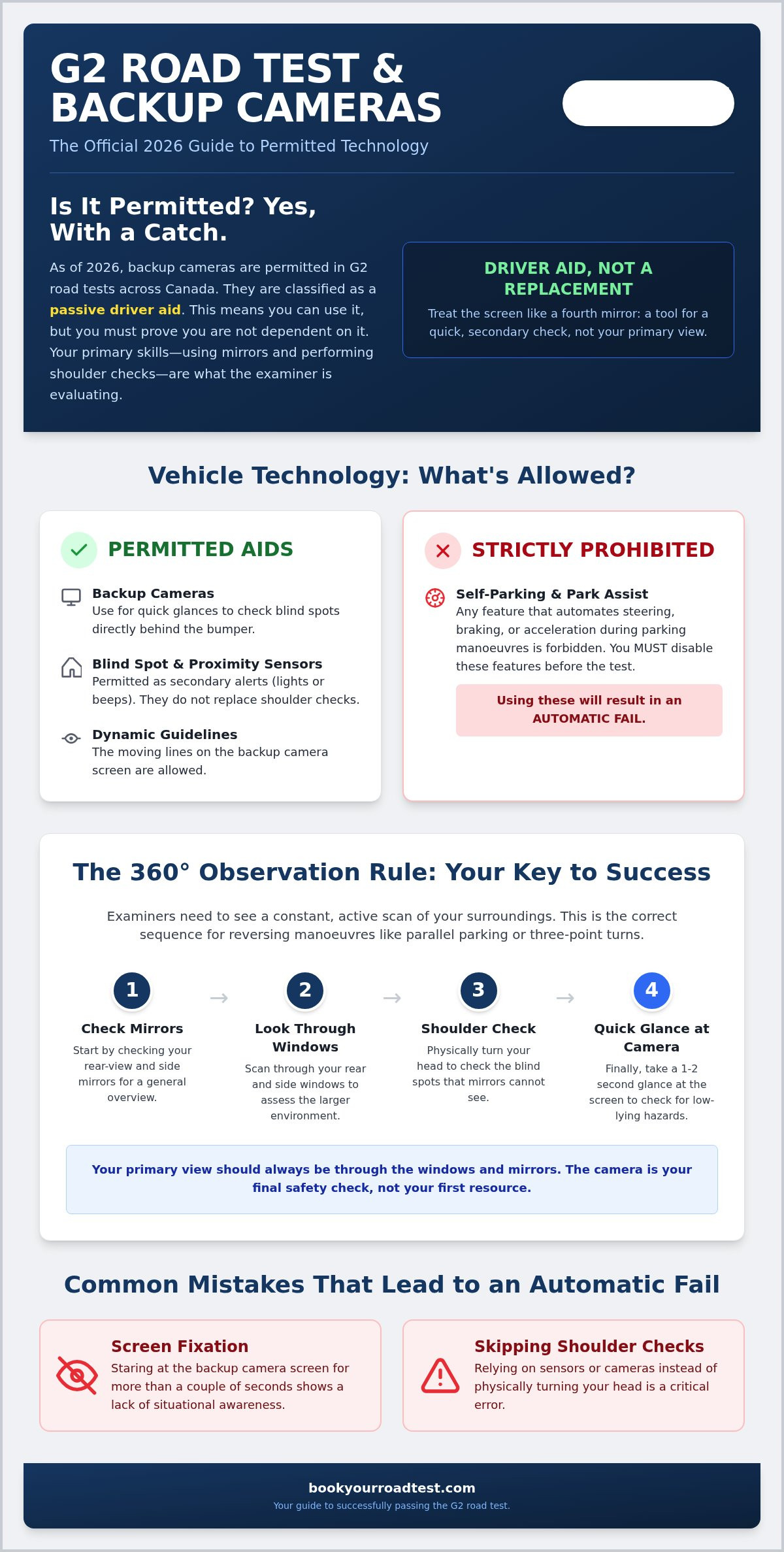
Yes, you can absolutely use a vehicle equipped with a camera for your G2 road test across Canada. As of September 2026, Canadian road safety authorities recognize that most modern vehicles sold in Canada come standard with this technology. However, using a car with backup camera for g2 test comes with a specific set of expectations from your examiner. You aren't required to disable the system; instead, you must demonstrate that you can drive safely without becoming dependent on the screen. The camera is officially classified as a driver aid, which means it supports your observation rather than replacing your mirrors or shoulder checks.
The distinction between having a camera and relying on it is where many students struggle. You should never cover the screen yourself unless specifically instructed by the examiner. Doing so might actually create a safety hazard by removing a tool designed to detect hazards in your blind spots. Your goal is to prove you're a competent driver who uses every available resource without letting technology do the work for you.
The Definition of a Driver Aid in 2026
Canadian driving test administrators categorize Backup camera technology as a passive safety feature. This distinction is vital for your success. Passive aids provide information but don't take control of the vehicle. During your G2 test, examiners look for a primary view through your windows and mirrors. The camera provides a secondary view to check for small objects or hazards directly behind the bumper that mirrors might miss. You should treat the screen like a fourth mirror. A quick glance is acceptable, but fixing your eyes on the display for more than a second or two suggests you lack the necessary situational awareness to pass.
Will the Examiner Ask You to Turn It Off?
It's a common myth that examiners will force you to cover your screen with a clipboard or tape. In 2026, driving test policies nationwide generally allow the screen to remain active. You should never volunteer to turn off your camera or dim the display before the test begins; doing so removes a legitimate safety tool. If your vehicle features dynamic guidelines that move with the steering wheel, these are also permitted. However, some examiners might ask you to dim the screen if they feel you are staring at it too much. If this happens, remain calm and follow their instructions. They aren't trying to fail you; they're ensuring you can perform a three-point turn or parallel park using traditional observation methods. Unless specifically instructed, leave the screen as is and focus on your 360-degree checks.
Permitted vs. Prohibited Vehicle Technology
Understanding the official DriveTest vehicle requirements is essential for any applicant. While examiners permit most modern safety features, they draw a clear line between technology that assists you and technology that replaces your skills. Using a car with backup camera for g2 test is acceptable because it falls into the category of passive safety. These systems provide visual or audible information without taking physical control of the vehicle's movement. In contrast, active features that intervene in steering or braking are often restricted or prohibited during the evaluation.
The distinction is simple. If the technology alerts you to a hazard, it's usually fine. If the technology fixes the problem for you, it's likely a problem for your test score. When you're using a car with backup camera for g2 test, you're expected to maintain full manual control at all times. Examiners need to see that you possess the fundamental skills to operate a vehicle safely in any environment, even if the electronics were to fail. This is why you must be intimately familiar with your vehicle's dashboard settings before the examiner enters the passenger seat.
Strictly Prohibited: Self-Parking Features
The most important rule regarding modern tech is that autonomous or semi-autonomous parking features are strictly forbidden. If you attempt to use a self-parking system during your parallel park, it will result in an immediate fail. The examiner must see you manipulate the steering wheel and pedals yourself. If the steering wheel begins to move on its own, the test is over. You should take the time to learn how to fully disengage "Park Assist" or similar modes in your car's menu system. Once you're confident that you can handle these manoeuvres manually, you can find a road test appointment to prove your skills.
Permitted Passive Tech: Blind Spot and Proximity Sensors
Blind-spot monitoring and proximity sensors are permitted during the G2 exam because they function as secondary alerts. These systems use lights in your side mirrors or audible beeps to warn you of nearby objects. While these are helpful, you must never use them as a substitute for a physical shoulder check. Failing to turn your head and check your blind spot is one of the most common reasons for losing marks. You should treat these sensors as a backup safety net. If a sensor beeps while you're reversing, use it as a prompt to stop and perform a full 360-degree check of your surroundings. This shows the examiner that you're using the technology as a tool to enhance your own observation skills rather than relying on it to do the work for you.
The 360-Degree Observation Rule: Passing the Parallel Park
Passing the parallel parking portion of your exam requires more than just aligning your vehicle with the curb. The examiner is primarily scoring your observation skills and your ability to manage the space around your car. When using a car with backup camera for g2 test, you must strictly follow the hierarchy of "Primary View" versus "Secondary Aid." Your primary view consists of your mirrors and, most importantly, your windows. The camera is merely a secondary aid to help you gauge the final few centimetres of distance. If your eyes remain fixed on the dashboard screen for more than two seconds at a time, the examiner will likely penalize you for poor observation.
The 360-degree observation rule means you are responsible for everything happening around your vehicle, not just what is directly behind it. While the official DriveTest vehicle requirements permit the use of these cameras, they do not waive the requirement for physical head turns. You must demonstrate a continuous scanning pattern that shows you're aware of approaching cyclists, pedestrians on the sidewalk, and other motorists who might enter your path while you're focused on the manoeuvre.
The "Glance Technique" for Backup Cameras
To use your camera effectively without losing marks, you should adopt the "glance technique." This involves a 90/10 ratio: 90% of your time should be spent looking through your windows and mirrors, while only 10% is spent glancing at the screen. Use the camera only at the very end of the park to check your distance from the rear vehicle or the curb. This brief look confirms what your mirrors have already told you. By keeping your glances short, you prove to the examiner that you're in total control of the vehicle and aren't relying on the technology to do the work for you.
Physical Head Turns and Blind Spots
A backup camera has a limited field of view and cannot see "around the corner" of your car's rear pillars. This is why the "theatrical" head turn is so important during your test. You need to make your movements obvious enough that the examiner clearly sees you checking your blind spots. Before you even shift into reverse, perform a full 360-degree check. As you move, continue to turn your head to look over your shoulder. A camera won't catch a child running toward your car from the side or a car pulling out of a driveway across the street. Consistent, physical head turns are the only way to satisfy the examiner's requirement for full situational awareness.
Common Mistakes and How to Avoid an Automatic Fail
The psychological pressure of a road test is intense. You aren't just being judged on your parking accuracy; you're being judged on your habits. When using a car with backup camera for g2 test, many students forget that the examiner is watching their eyes more than the car's position. If you stare at the display, you lose marks for observation. You must show that you are scanning your entire environment. This requires a level of focus that goes beyond simply looking at a screen.
Hitting a curb remains a major error that can lead to an automatic fail. A camera provides a wide angle, but it can distort distances or fail to show the exact point where your tire meets the pavement. You should rely on your side mirrors, properly adjusted before the test begins, to confirm your proximity to the curb. If your camera lens is obscured by rain, snow, or road salt, you're still expected to complete the manoeuvre safely. Clean your lens before you arrive at the centre to avoid unnecessary stress and ensure you have a clear view if you need it.
The Danger of Screen Fixation
Staring at the screen creates tunnel vision. You might miss a hazard in front of your vehicle while the front end swings out during a parallel park. This is a common trap that leads to failed exams. Practice reversing in empty parking lots with the screen covered to build the muscle memory required for the test. This builds the confidence needed to treat the screen as a brief reference point rather than a lifeline. If the examiner notices you aren't checking your front corners, they'll mark it as a lack of situational awareness.
What to Do if Your Tech Malfunctions
If your screen freezes or the camera fails mid-test, don't panic. DriveTest requires your vehicle to be in good working order, but a tech glitch doesn't have to mean an automatic fail if you can still drive safely. Demonstrate your competence by immediately switching to your mirrors and physical head turns. Showing you can handle a tech failure with composure can actually impress an examiner. It proves you're a skilled driver, not just someone who can follow lines on a display. Once you've mastered these manual skills, you can book your G2 road test through our cancellation finder to secure an earlier date.
Final Checklist: Booking and Preparing for Your G2
Preparing for your exam involves more than just mastering the 360-degree check. While using a car with backup camera for g2 test is permitted, the vehicle itself must meet strict safety standards to avoid a last-minute cancellation. Arriving with a clean car and organized paperwork reduces anxiety and allows you to focus entirely on your driving performance. Your examiner will perform a basic safety check before you even leave the parking lot, so early preparation is vital.
Documentation is the second half of the equation. You must bring your original, physical G1 licence to the appointment. Photocopies or digital versions are not acceptable and will result in a turned-away test. Ensure your vehicle's insurance and registration papers are current and easily accessible in the glovebox. Being organized shows the examiner that you are a responsible driver who takes the rules of the road seriously.
Vehicle Preparation for Test Day
Your vehicle must be in top mechanical condition to be accepted for a road test. Use this checklist to ensure your car passes the initial inspection:
- Clean the camera lens: Use a soft cloth to remove road salt, dirt, or dried rain spots that could blur your display.
- Test all lights: Verify that your brake lights, turn signals, and headlights are functioning correctly. A single burnt-out bulb will result in a cancelled test.
- Check tire pressure: Ensure your tires are properly inflated and that no "low pressure" warning lights are active on your dashboard.
- Clear the dashboard: Remove any aftermarket phone mounts, GPS units, or hanging air fresheners that might obstruct your view or the examiner's view of the road.
Securing Your Road Test Date
Once your vehicle is ready, the final hurdle is finding an available appointment. The standard booking system often has long wait times, which can be frustrating when you feel prepared to test immediately. You can use a road test cancellation finder Ontario to skip the queue and find an opening that fits your specific schedule. This tool is designed to help you secure a date much sooner than the standard system allows.
We provide a simplified interface to book a G2 road test at over 60 centres across the province. It is important to realize that Book Your Road Test is an independent third-party provider and not affiliated with the Ministry of Transportation or DriveTest. We charge an administration fee to offer this stress-relief service and proprietary search tool. This transparent model allows us to help you manage your booking efficiently, providing a reliable shortcut for drivers who are in a hurry to secure their time-sensitive appointments.
Take the Wheel with Confidence
Mastering the balance between modern technology and traditional observation is your final step toward licensing success. By treating your screen as a secondary aid and maintaining your 360-degree checks, you prove to the examiner that you're a safe, attentive driver. Remember that using a car with backup camera for g2 test is fully permitted under 2026 rules, provided you don't fall into the trap of screen fixation.
Now that you understand the regulations and have your vehicle checklist ready, it's time to secure your appointment. We act as a trusted third-party facilitator to help you navigate the scheduling process without the usual frustration. With support for over 60 DriveTest centres and a proprietary cancellation finder, we help you find earlier dates so you can test when you feel most prepared. This administrative support ensures you can focus on your driving rather than refreshing a booking page.
Secure your G2 road test date today with our easy booking service. You've put in the practice hours and studied the rules; now it's time to demonstrate your skills and earn your independence on the road.
Frequently Asked Questions
Can I use my backup camera for parallel parking during the G2 test?
You are permitted to use a backup camera as a driver aid while parallel parking. However, you cannot rely on the screen as your primary source of information. Examiners expect you to perform 360-degree checks and look over your shoulder. You should use your mirrors for the majority of the manoeuvre and only glance at the camera to confirm your distance from the curb or the vehicle behind you.
Will I fail if I look at the backup camera for too long?
Staring at the camera for more than a couple of seconds can lead to a failing grade. This habit is known as screen fixation and suggests a lack of situational awareness. Examiners score your ability to monitor all surroundings, including the front and sides of the car. If you fail to perform physical head turns because your eyes are glued to the dashboard, you will lose significant marks for observation.
Do I need to cover my backup camera screen with a cloth?
You don't need to cover your screen before the test begins. In 2026, DriveTest policy allows the camera to remain active as it is a standard safety feature in Canadian vehicles. You should never volunteer to disable or hide the screen yourself. If an examiner feels you are relying on it too heavily, they might ask you to dim the display or cover it, but this is handled on a case-by-case basis.
Are parking sensors allowed on the Ontario road test?
Audible parking sensors are allowed because they are categorized as passive safety technology. These sensors provide an additional layer of awareness by beeping as you approach an object. While they are helpful, you must still demonstrate proper observation techniques. If a sensor alerts you to a hazard, use it as a prompt to stop and perform a full head turn to identify the obstacle manually before continuing.
What happens if my backup camera stops working during the test?
If your camera fails mid-test, you must continue using your mirrors and physical observation. A tech malfunction isn't an automatic fail if you demonstrate that you can drive safely without it. However, your vehicle must generally be in good working order to be accepted at the start of the exam. If the camera is broken before you begin, ensure you are fully confident in reversing using only traditional methods.
Can I use a car with a 360-degree bird’s-eye view camera?
Vehicles with 360-degree or bird's-eye view cameras are permitted for the G2 road test. These systems are treated exactly like standard backup cameras; they are aids rather than replacements for your eyes. You must still look through your windows and check your mirrors constantly. Relying on the top-down digital view to align your car will result in a penalty for failing to observe the actual environment around you.
Does a backup camera make the G2 test easier to pass?
Having a camera doesn't necessarily make the test easier because the scoring criteria focus on your observation habits. While it helps with distance, it can tempt drivers to stop checking their blind spots. To succeed while using a car with backup camera for g2 test, you must prove you can park without staring at the screen. Passing requires showing the examiner that you are a skilled observer who uses technology only as a final check.
Can I use a Tesla for my G2 road test?
You can use a Tesla or any other electric vehicle, but all autonomous features must be disabled. This includes Autopilot, Full Self-Driving, and Auto-Park modes. If the car steers or brakes on its own, it is an immediate disqualification. Ensure you know how to navigate the touchscreen to turn off active interventions. Examiners must see that you are the one making every steering and braking decision throughout the entire duration of the test.


