
What if the four month wait for your G2 or G road test is actually a technical hurdle you can bypass? If you have spent hours staring at a "session timed out" screen or an error message during licence verification, you're not alone. Many Ontario drivers face persistent drivetest booking problems that turn a simple administrative task into a months-long headache. While official goals aim for appointments within 42 days, the reality in centres like Brampton or Mississauga often involves wait times stretching far beyond that window.
We understand that these delays are more than just an inconvenience; they're a barrier to your independence. This guide provides the technical fixes and strategic shortcuts you need to navigate system glitches and secure a successful booking confirmation. You'll learn why specific errors occur, how to manage the 45 minute session limit, and how to find hidden openings that others miss. We'll show you how to move past the frustration and get your road test scheduled with professional efficiency.
Key Takeaways
- Identify the specific causes of drivetest booking problems, from high-volume traffic delays to licence eligibility verification errors.
- Resolve technical website glitches by understanding browser compatibility and managing the strict 45-minute session limit during checkout.
- Learn the strategic timing of when road test cancellations reappear in the system to secure earlier dates in high-demand centres.
- Streamline your administrative process by organizing all required documentation and payment information before you begin the booking flow.
- Discover how utilizing a specialized Road Test Cancellation Finder can help you bypass the standard four-month wait times for Ontario licensing exams.
Common DriveTest Booking Problems and Why They Occur
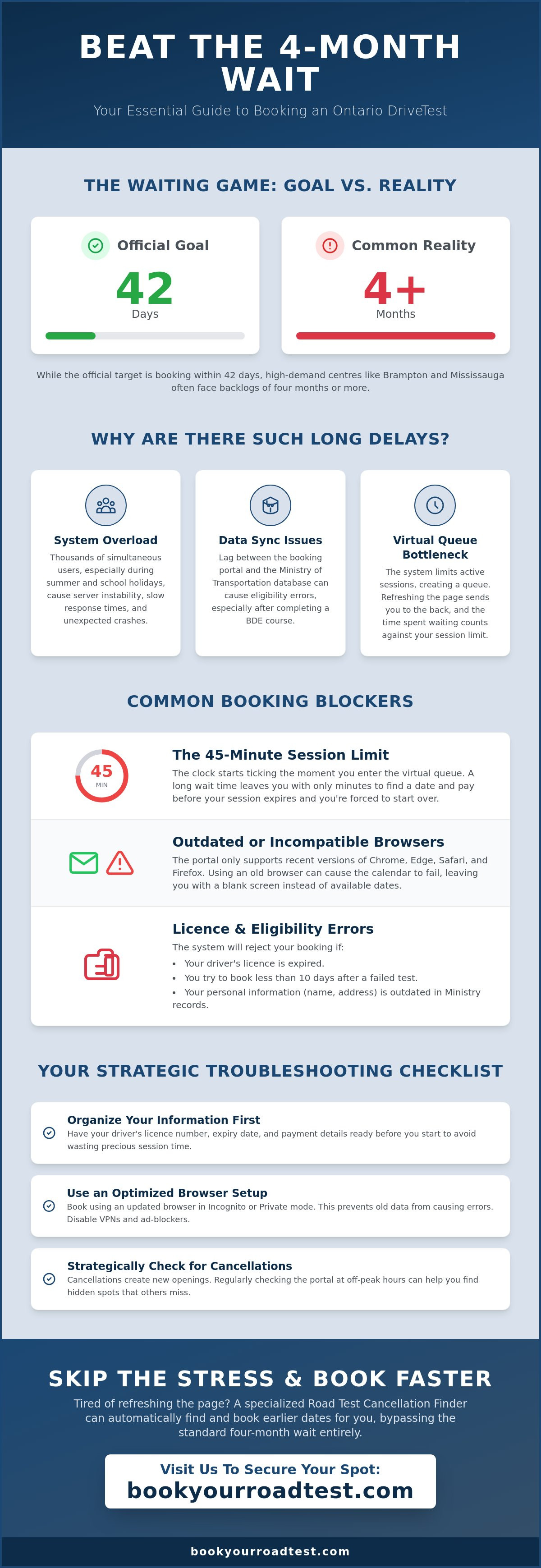
Most drivers expect a simple digital transaction. Instead, they find a system struggling under the weight of thousands of simultaneous users. These drivetest booking problems often stem from a combination of outdated infrastructure and extreme seasonal demand. During the summer months and school holidays, the influx of new applicants spikes significantly. Centres in the GTA like Brampton or Mississauga experience such high volume that server stability fluctuates; this leads to unexpected crashes or slow response times. Understanding the driving test process and its administrative requirements is the first step toward troubleshooting these common digital hurdles. While the Ministry aims for a 42-day window, the reality is often a four-month backlog that puts immense pressure on the booking portal. This pressure translates into technical errors that can kick users out of the system without warning, especially when the database is struggling to reconcile thousands of real-time licence verifications.
Data discrepancies are another frequent source of frustration. The booking portal relies on a real-time handshake with the Ministry of Transportation database. If there is a lag in this communication, the system may fail to recognize your eligibility. This is common if you've recently completed a Beginner Driver Education (BDE) course. While the course reduces your wait time from 12 months to eight, the system won't allow an earlier booking until the driving school has processed your certification and the Ministry has updated your file. Relying on the official status page is rarely enough, as it often fails to account for these internal software synchronization issues that occur behind the scenes.
Understanding the Virtual Queue and Server Lag
The virtual queue is a protective measure designed to prevent the website from crashing. You'll often see a "wait time" screen even during off-peak hours. This happens because the system limits active sessions to maintain security and prevent bot activity. If you refresh the page while in this queue, you lose your spot and go back to the end of the line. It's a frustrating bottleneck. Lag often peaks on Monday mornings or immediately after the Ministry releases new dates, as thousands of users attempt to access limited resources simultaneously.
Licence and Eligibility Verification Issues
If the portal rejects your licence number, it's usually due to a discrepancy with Ministry records. Ensure your licence hasn't expired; you can't book a test if your current class has lapsed. Another hurdle is the mandatory 10-day wait after a failed attempt. Trying to book a new test before this period ends results in an eligibility error. To avoid further drivetest booking problems, ensure your address and name records are updated, as system sync delays can cause temporary login blocks that prevent you from reaching the calendar page.
Navigating Technical Errors and Website Glitches
Technical errors on the DriveTest portal often happen at the worst possible time: right before you hit "confirm." These issues are frequently categorized among common failures of government digital services, where legacy systems struggle to maintain session persistence under heavy load. One of the most frequent drivetest booking problems is the "session expired" error. This usually occurs because the system enforces a strict 45-minute limit from the moment you enter the virtual queue. If the queue takes 30 minutes to clear, you're left with only 15 minutes to complete your transaction. If you exceed this, the server drops your connection to free up space for the next user, forcing you to restart the entire process from scratch.
Browser choice matters more than most applicants realize. Official support is limited to the last two years of Chrome, Microsoft Edge, Safari, and Firefox. If you're still using an outdated version or Internet Explorer, the site simply won't function correctly. JavaScript scripts that handle the calendar rendering often fail on older engines, leading to a blank screen where the available dates should be. To avoid these drivetest booking problems, ensure your browser is updated to the latest version before you attempt to log in. This small technical check can prevent the system from hanging during the critical payment phase.
Optimizing Your Browser for the Booking Portal
Persistent errors are often caused by "sticky" cache files or corrupt cookies that store old session data. Using Incognito or Private mode is the most effective way to ensure a clean slate. This prevents the browser from trying to use old, invalid login tokens that trigger verification errors. You should also disable any active VPNs or aggressive ad-blockers. These tools can accidentally block the secure scripts required for the payment gateway to communicate with your bank, leading to a "transaction failed" message even if your card details are perfectly accurate.
Troubleshooting Payment and Confirmation Failures
Few things are more stressful than seeing a charge on your credit card without receiving a confirmation email. If this happens, don't panic or immediately try to book again, as this often leads to double-billing. Instead, log back into the portal and check your "Dashboard" or "Existing Bookings" section. The system often updates the internal record before the email server sends out the notification. If the test appears there, your slot is secure. If the charge is pending but no booking exists, the system usually reconciles and reverses the transaction within 3 to 5 business days. For those who want to avoid these technical headaches entirely, using a professional road test booking service can provide a more streamlined experience by handling the administrative interface for you.
Solving the "No Available Dates" Dilemma
Finding an empty slot on the calendar often feels like winning the lottery. In high-demand regions like the Greater Toronto Area, the reality is a consistent four-month backlog for G2 and G road tests. These drivetest booking problems persist because the demand for appointments far outstrips the daily capacity of local examiners. While the system aims for a six-week availability window, the sheer volume of applicants often pushes dates into the next season. This inefficiency is not unique to Ontario; it mirrors known vulnerabilities in government programs where legacy infrastructure fails to adapt to modern population growth. To secure a date, you must understand that the calendar is dynamic. Slots reappear the moment another driver cancels or reschedules their appointment; however, these openings are often claimed within seconds by other users.
Manual searching is often too slow for high-demand spots. By the time you navigate the virtual queue and select a date, another user may have already finalized their payment for that exact time. This race to the finish is a primary cause of ongoing drivetest booking problems for those with urgent licensing needs. If you rely solely on manual refreshes, you are competing against thousands of other drivers looking for the same limited inventory.
The Best Times to Check for New Openings
Manual searching requires a strategic approach to timing. Most system updates and batch releases of new dates occur during off-peak hours when server load is lowest. Drivers who check the portal between 3:00 AM and 6:00 AM often find newly released blocks of time that weren't visible the night before. Additionally, the 48-hour cancellation rule creates a predictable surge in availability. Since applicants must cancel at least two days in advance to avoid losing their fee, checking the portal exactly 48 to 72 hours before a desired date can reveal last-minute openings. Holiday weekends also see a spike in reschedules as people realize they have travel conflicts.
Broadening Your Search Parameters
If your local centre is fully booked, consider expanding your geography. While Brampton and Mississauga have wait times of 4 to 6 months, smaller centres often have significantly more flexibility. You can search for M2, G2, or G test dates across different regions to find the earliest possible slot. Just remember that you must be prepared to drive in an unfamiliar area. If you already have a test booked but want something sooner, you can use the reschedule function to hunt for cancellations. Be mindful that you must provide at least 48 hours' notice to move an existing appointment without forfeiting your prepaid exam fee.
Strategic Troubleshooting: How to Secure a Slot Faster
Speed is your greatest asset when dealing with drivetest booking problems. Because the system updates in real-time, the few seconds it takes to find your credit card can be the difference between securing a slot and seeing a "date no longer available" message. You must have your Ontario driver's licence number and a valid payment method ready before you enter the virtual queue. Successful applicants treat the booking process like a time-sensitive transaction rather than a casual search. By preparing your details in advance, you minimize the risk of the session timer expiring while you're still typing in your billing address. Organizing your information beforehand ensures that when a cancellation does appear, you can finalize the appointment before another user claims it.
Account lock-outs are a common hurdle for persistent searchers. If the system detects too many failed login attempts or rapid-fire page refreshes, it may temporarily flag your IP address or licence number. This "Too Many Attempts" error is designed to prevent bot activity, but it often catches frustrated human users in its net. If you find yourself locked out, wait at least two hours before trying again. Attempting to force your way back in usually extends the lockout duration, making it impossible to grab a cancellation that might appear in the meantime. You should also set realistic expectations based on the test type; while G2 tests are in high demand due to the volume of new drivers, G road test slots can be equally scarce in urban centres due to the 12-month mandatory wait period between licensing levels.
A Step-by-Step Recovery Plan for Failed Bookings
When a booking fails, you need a systematic approach to get back on track. First, close all browser tabs and clear your temporary internet files to ensure no old session data interferes with your next attempt. Next, verify your current status on the official Ministry of Transportation site to confirm you don't have outstanding fines or unresolved eligibility issues. Finally, try your next search during a documented low-traffic period, such as mid-week afternoons. If you suspect a local centre disruption, check regional news before assuming the fault lies with your account, as local relocations like the Brampton move to Shoppers World Mall on June 8, 2026, can cause temporary scheduling pauses.
The Advantage of Automated Monitoring
Professional monitoring provides a distinct edge over manual persistence. While a human user might check the portal ten times a day, specialized tools scan for openings constantly, identifying cancellations the millisecond they are released back into the pool. This efficiency is particularly valuable for M2, G2, or G road tests where specific time slots are in high demand. If you're tired of the manual search and want to bypass the usual wait times, you can book your road test through a service that utilizes a specialized search tool to find earlier dates that fit your specific schedule. This approach removes the guesswork and ensures you don't miss out on a cancellation simply because you weren't at your computer when the slot became available.
Avoiding the Stress with a Professional Booking Service
While technical troubleshooting can resolve many drivetest booking problems, the process remains time-intensive and mentally draining for most Ontario drivers. Many applicants find that even with the best browser settings, the sheer competition for dates in cities like Brampton or Mississauga makes manual scheduling nearly impossible. This is where a professional booking service provides a necessary shortcut. By acting as an efficient, honest facilitator, Book Your Road Test manages the administrative burden for you. Instead of refreshing a browser for hours, you can utilize our Road Test Cancellation Finder Ontario to identify and secure openings as they happen. This service is designed for drivers who value their time and need to bypass the standard four-month backlog without the stress of constant monitoring.
We provide comprehensive support for all licence classifications, including G, G2, and specialized M2 road test booking. Our approach is built on professional transparency. We charge a clear administrative fee to manage your booking, which many find to be a worthwhile investment when compared to the cost of delaying employment or personal travel plans. By organizing your request through our system, you gain an advocate that understands the technical quirks of the provincial scheduling portal.
Why a Concierge Service is Worth the Investment
Choosing a concierge service means you no longer have to worry about session timeouts or payment gateway failures. We handle these technical hurdles on your behalf, ensuring that your request is processed efficiently through the proper administrative channels. This expert handling provides peace of mind, especially for those who have previously experienced "Too Many Attempts" lockouts or eligibility errors. You save hours of manual clicking and page refreshing. This allows you to focus on practicing your driving skills rather than fighting with a digital interface that was never designed for high-speed competition.
Ready to Book Your Road Test?
Our simplified interface is designed for rapid action and immediate results. When you choose to work with us, we take over the task of monitoring regional centres for the specific dates you need. It is essential to clarify that Book Your Road Test is an autonomous, independent service provider. We are not affiliated with the Ministry of Transportation or DriveTest. We are a professional administrative service that simplifies the scheduling process for a fee, offering a reliable alternative to the standard manual method. If you're ready to secure your spot and realize your goal of becoming a fully licensed driver, our team is prepared to help you find the earliest possible date.
Secure Your Ontario Road Test Date Today
Managing drivetest booking problems requires a blend of technical patience and strategic timing. You've learned that optimizing your browser and understanding the virtual queue can prevent session timeouts during the critical checkout phase. You also know that broadening your search to regional centres and checking during off-peak hours are proven methods for finding elusive cancellations. However, manual searching remains a time-consuming task that doesn't always guarantee results in a competitive market.
Our team manages scheduling for over 60 DriveTest centres across Ontario, providing expert support for G2, G, and motorcycle licences. We utilize a specialized cancellation finder service to identify and secure appointments that fit your specific schedule, saving you from the frustration of constant refreshes. Skip the frustration and book your road test with ease today!
Securing your licence is a major milestone in your independence. Whether you choose to navigate the system yourself or employ a professional concierge, staying persistent is the key to success. You'll be behind the wheel and on the road sooner than you think.
Frequently Asked Questions
Why does the DriveTest website keep timing out when I try to pay?
The website times out because of a strict 45-minute session limit that begins the moment you enter the virtual queue. If high traffic volumes cause a long wait in the queue, you may have very little time left to complete your payment before the server ends your session. To avoid these drivetest booking problems, have your payment details ready before you log in. This ensures you can finalize the transaction quickly once you reach the checkout page.
What should I do if I didn’t receive a confirmation email for my road test?
You should log back into the portal and check the "Existing Bookings" or "Dashboard" section immediately. Confirmation emails are frequently delayed by server lag, but the internal system updates your record as soon as the transaction is successful. If the appointment appears in your dashboard, your slot is secure. If you don't see it and your card was charged, wait three business days for the system to reconcile and reverse the payment.
How often are new road test dates added to the Ontario system?
New road test dates are added to the system in real-time as other drivers cancel or reschedule their appointments. While cancellations happen throughout the day, the Ministry often releases larger batches of new dates during off-peak hours between 3:00 AM and 6:00 AM. Checking the portal during these low-traffic windows increases your chances of finding a newly available slot before other applicants claim it through the manual interface.
Can I book a road test at a different centre than the one closest to me?
You are permitted to book your road test at any DriveTest centre in Ontario, regardless of where you live. Many drivers choose centres in smaller towns like Owen Sound or Smiths Falls to find earlier availability or avoid the heavy congestion of the GTA. Just ensure you are comfortable driving in the specific geography of that region, as road conditions and traffic patterns vary significantly across the province compared to urban areas.
Why does the system say my driver’s licence number is invalid?
Your licence number may be rejected if the system detects an expiry, a name mismatch, or an unresolved eligibility issue. These drivetest booking problems also occur if you try to book a new test within the mandatory 10-day waiting period following a failed attempt. Double-check that your licence is currently valid and that the information you enter exactly matches the records on your physical card and Ministry of Transportation file before attempting to log in again.
How can I find a road test cancellation for an earlier date?
You can find a cancellation by manually refreshing the portal or by using a specialized Road Test Cancellation Finder. Cancellations are released back into the pool the moment a driver reschedules, which must happen at least 48 hours before their test to avoid fee loss. Because these spots are claimed almost instantly, using an automated service provides a significant advantage in identifying and securing an earlier date that fits your specific schedule and location preferences.
Is there a limit to how many times I can try to book in one day?
There is no official daily limit on booking attempts, but the system uses security software to monitor for bot-like activity. If you refresh the page too rapidly or attempt to log in many times within a short window, you may trigger a temporary account lock-out. This security measure is designed to maintain server stability during periods of high demand. If you are flagged, it is best to wait at least two hours before attempting to log in again.
What happens if the DriveTest centre is closed on my scheduled day?
If a centre closes due to weather, power outages, or relocation, your appointment will be cancelled and your fee will remain as a credit on your account. DriveTest typically attempts to notify applicants via email or phone, but you should check the official status page if disruptions are expected. For example, the Brampton centre is moving to Shoppers World Mall on June 8, 2026. You can then log back into the system to select a new date.


